
Read and share your Weekly AI Insights scorecard
Quick answer
The Weekly AI Insights scorecard is emailed to your workspace Admins every Monday morning, covering the Monday to Sunday before. It highlights one headline result, such as customers answered after hours or hours saved, and gives you a page where you can share it on WhatsApp, Telegram or email.
Monday, 9am. Before you have unlocked the shutter, an email tells you that 38 customers got an answer last week while you were asleep. That is a number worth showing your business partner.
The Weekly AI Insights scorecard is a short summary of what your AI assistant did for your business last week. It arrives by email, leads with the result that stood out most, and comes with a ready-made card you can share.
With it you can:
- See at a glance how many customers your assistant helped, including after hours.
- Know how much of your team's time it saved.
- Share the result with your partner, your staff group or your followers in a couple of taps.
When it arrives
- HeyBirdy emails the scorecard every Monday morning, in the 9am hour of your workspace time zone.
- It covers the previous week, from Monday to Sunday.
- It goes to the Admins of your workspace by default.
If last week was too quiet to report on, for example because your assistant had no conversations, no scorecard is sent that Monday. The next one arrives after a week with enough activity.
What the scorecard shows
Each scorecard leads with one headline, chosen from the strongest result of the week, in this order:
- After hours, my AI answered: customers who messaged outside your working hours and were answered.
- My AI handled: the share of conversations your AI assistant handled.
- My AI saved me: the hours of work your team saved.
- My AI replies in just: your assistant's average reply time.
Below the headline, a few supporting figures fill in the picture. Depending on your week, they include:
- hours of work saved
- answered by AI
- customers helped overnight
- customer rating
- average reply time
- customers helped
Hours saved is an estimate. HeyBirdy counts the conversations your AI assistant resolved on its own and allows a set amount of team time for each one.
The after-hours figures depend on the working hours in your Workspace Settings. If those hours are not right, the after-hours numbers will not be either.
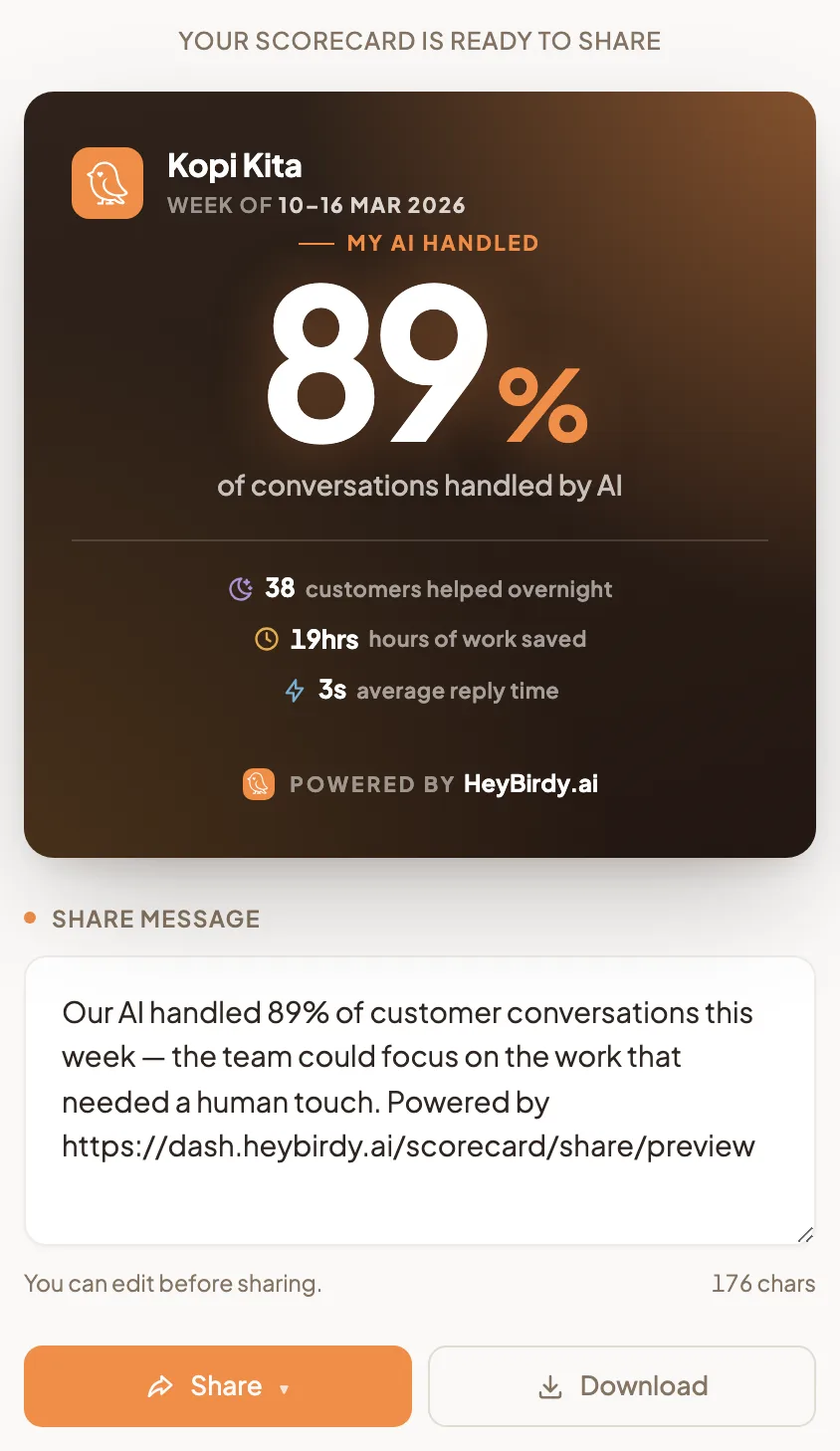
Share your scorecard
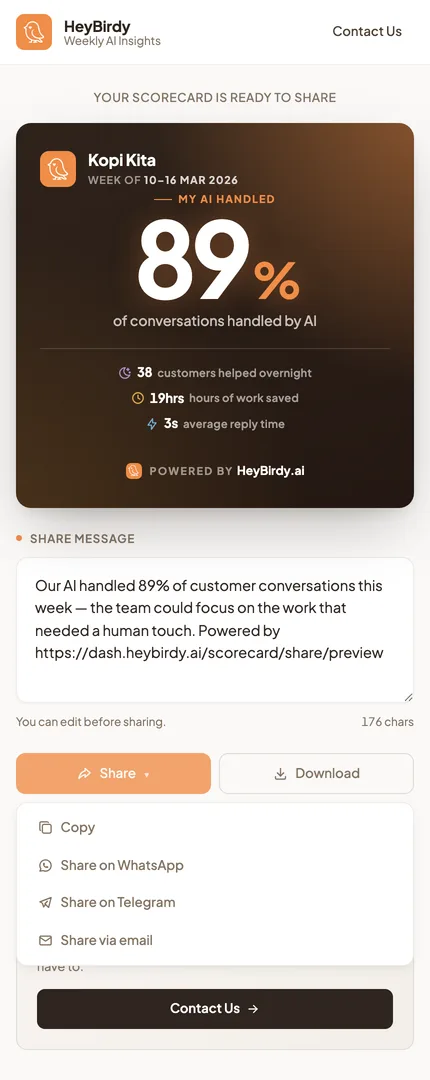
The email links to your scorecard page. It shows the card, a Share message written for you, and the share buttons.
- Read the Share message. You can edit it before sharing, and the count under it shows how long it is.
- Select Share.
- On most phones, your phone's own share menu opens, so you can pick any app.
- Elsewhere, including most computers, a menu opens with Copy, Share on WhatsApp, Share on Telegram and Share via email.
- To post the card as a picture, select Download. HeyBirdy saves the card as an image you can attach anywhere.
Copy puts the message on your clipboard, ready to paste into WhatsApp, Instagram or anywhere else.
If the page says there are no insights
If you open a scorecard link and see No insights to share this week, there is no scorecard for that link. Check back next Monday. A new scorecard is generated every Monday morning from the week's customer conversations.
A quiet scorecard is useful too. If the numbers are lower than you hoped, look at Unanswered Questions and Instant Answers. Every answer you add this week is one more customer helped on next Monday's card.